<?xml version="1.0" encoding="utf-8"?><feed xmlns="http://www.w3.org/2005/Atom" ><generator uri="https://jekyllrb.com/" version="3.9.5">Jekyll</generator><link href="https://nazuke.github.io/SEOMacroscope/feed.xml" rel="self" type="application/atom+xml" /><link href="https://nazuke.github.io/SEOMacroscope/" rel="alternate" type="text/html" /><updated>2024-03-31T08:33:29+00:00</updated><id>https://nazuke.github.io/SEOMacroscope/feed.xml</id><title type="html">SEO Macroscope</title><subtitle>SEO Macroscope is a free and open source website broken link checker and Technical SEO toolbox for Windows.
</subtitle><entry><title type="html">New v1.7.6.1 release of SEO Macroscope: Predestination</title><link href="https://nazuke.github.io/SEOMacroscope/2019/02/17/seo-macroscope-release-v1.7.6.1.html" rel="alternate" type="text/html" title="New v1.7.6.1 release of SEO Macroscope: Predestination" /><published>2019-02-17T00:00:00+00:00</published><updated>2019-02-17T00:00:00+00:00</updated><id>https://nazuke.github.io/SEOMacroscope/2019/02/17/seo-macroscope-release-v1.7.6.1</id><content type="html" xml:base="https://nazuke.github.io/SEOMacroscope/2019/02/17/seo-macroscope-release-v1.7.6.1.html"><![CDATA[<p class="lead">This is a simple release of SEO Macroscope that adds some shortcuts for preset crawl configurations. For example, only crawling the HTML pages on a site, ignoring linked assets. This can save a little bit of time switching options on and off in the preferences panels.</p>

<p>Source code and an installer can be found on GitHub at:</p>

<ul>
  <li><a href="https://github.com/nazuke/SEOMacroscope/releases/tag/v1.7.6.1">https://github.com/nazuke/SEOMacroscope/releases/tag/v1.7.6.1</a></li>
</ul>

<p>Please check the <a href="/SEOMacroscope/downloads/">downloads page</a> for more recent versions.</p>

<h2 id="new-features-in-this-release-include">New features in this release include:</h2>

<ul>
  <li>Crawl configuration presets.</li>
</ul>

<h2 id="bug-fixes">Bug fixes</h2>

<ul>
  <li>Nothing significant for this release.</li>
</ul>

<p>Please report issues at <a href="https://github.com/nazuke/SEOMacroscope/issues">https://github.com/nazuke/SEOMacroscope/issues</a>.</p>

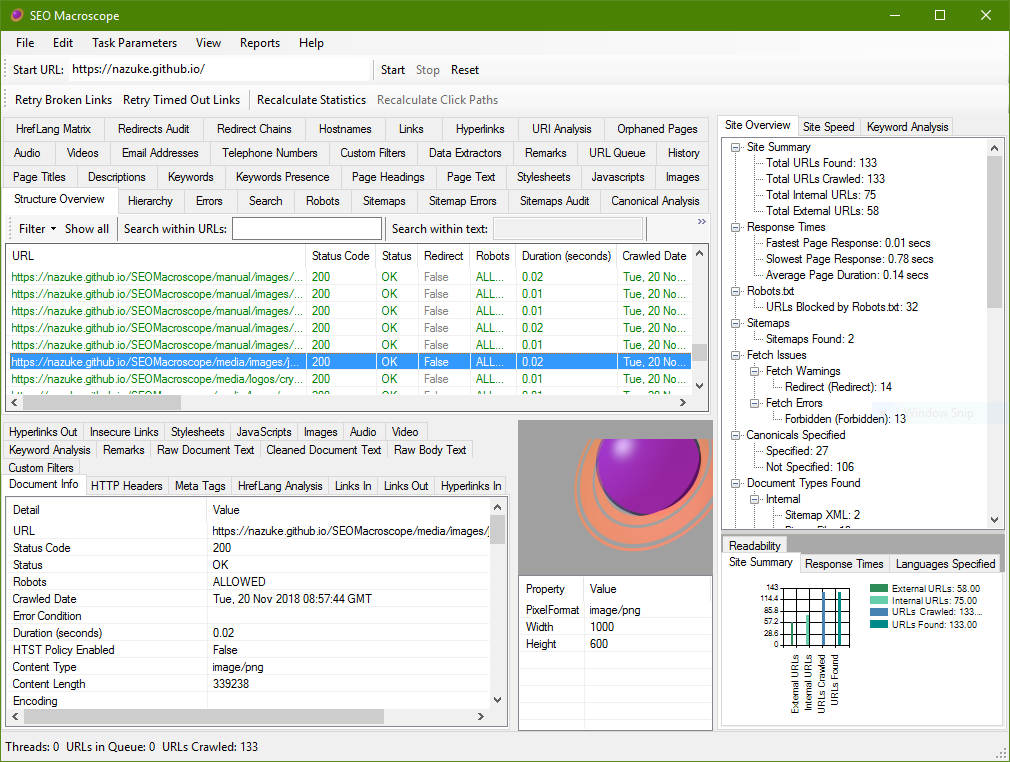
<p class="screenshot"><img src="/SEOMacroscope/media/screenshots/seo-macroscope-main-window-v1.7.6.png" alt="SEO Macroscope Application Window" class="img-responsive box-shadow" /></p>]]></content><author><name></name></author><summary type="html"><![CDATA[This release of SEO Macroscope adds some shortcuts for crawl configuration presets.]]></summary></entry><entry><title type="html">Verifying page keywords with SEO Macroscope</title><link href="https://nazuke.github.io/SEOMacroscope/2019/01/27/verifying-keywords-meta-tag-with-seo-macroscope.html" rel="alternate" type="text/html" title="Verifying page keywords with SEO Macroscope" /><published>2019-01-27T18:00:00+00:00</published><updated>2019-01-27T18:00:00+00:00</updated><id>https://nazuke.github.io/SEOMacroscope/2019/01/27/verifying-keywords-meta-tag-with-seo-macroscope</id><content type="html" xml:base="https://nazuke.github.io/SEOMacroscope/2019/01/27/verifying-keywords-meta-tag-with-seo-macroscope.html"><![CDATA[<p class="lead">One fairly recent feature request that I had for SEO Macroscope, was to analyze the contents of the <code class="language-plaintext highlighter-rouge">keywords</code> meta tag, and verify that the keywords specified did actually appear in the page’s body text.</p>

<p>As we all know, the <a href="https://webmasters.googleblog.com/2009/09/google-does-not-use-keywords-meta-tag.html"><code class="language-plaintext highlighter-rouge">keywords</code> meta tag</a> hasn’t been used by the major search engines for quite some time now.</p>

<p>However, in a recent feature request, it does appear that this particular tag still lingers in some CMS systems. In particular, the request in question uses this feature as a part of the editorial process to ensure that the keywords that are <em>supposed</em> to be in the page’s body text, <em>are</em> actually used in the page’s body text.</p>

<p>Naturally, as these pages are edited by users, and as it’s up to the users to ensure that their edits are consistent, this doesn’t always work as intended.</p>

<p>To that end, there’s a minor feature in SEO Macroscope now that analyzes the contents of the keywords meta tag, and verifies whether or not the keywords are mentioned in the title tag, the description tag, and the body text itself.</p>

<p>This can be used to determine whether or not the published web pages are consistent or not.</p>

<p>The process itself is automatic.</p>

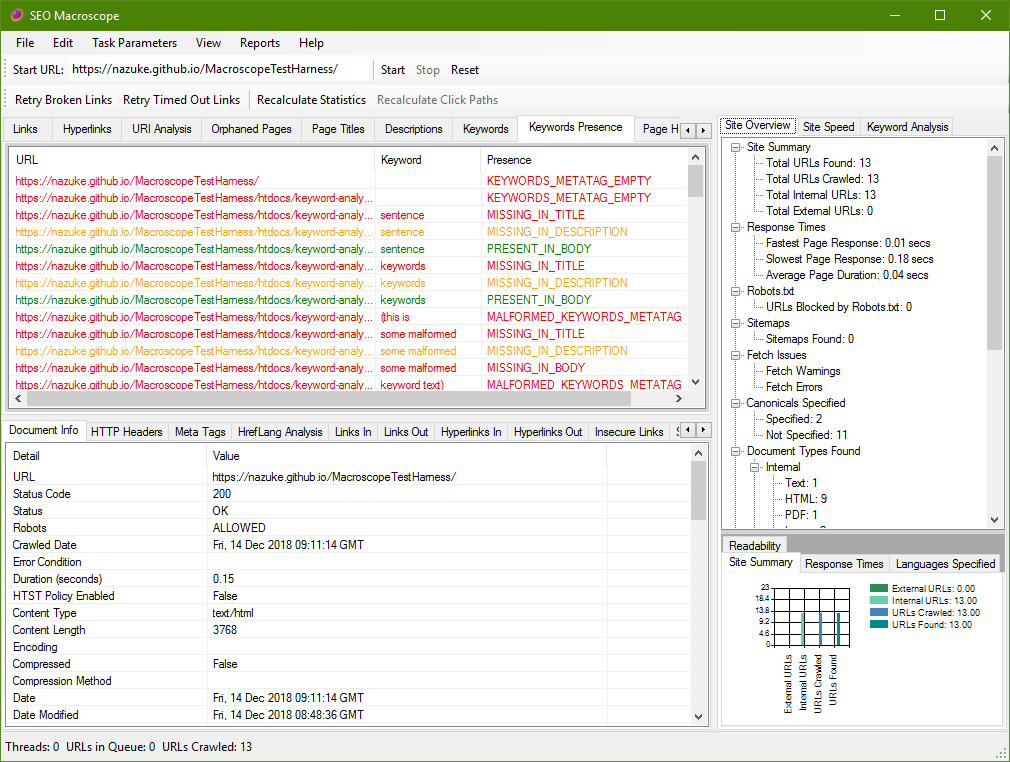
<p>First of all, carry out teh crawl process in the normal way. Speed things up by only crawling HTML pages. Once that’s done, the crawled document set will be available and the <strong>Keywords Presence</strong> tab can be selected.</p>

<p class="screenshot"><img src="/SEOMacroscope/media/screenshots/2018-12-14-verifying-keywords-meta-tag-with-seo-macroscope/keyword-crawl-results.png" alt="Crawled website results" class="img-responsive box-shadow" /></p>

<p>The <strong>Keywords Presence</strong> tab show one row for each keyword-related problem on each page.</p>

<p>#h2 Empty Keywords Meta Tag</p>

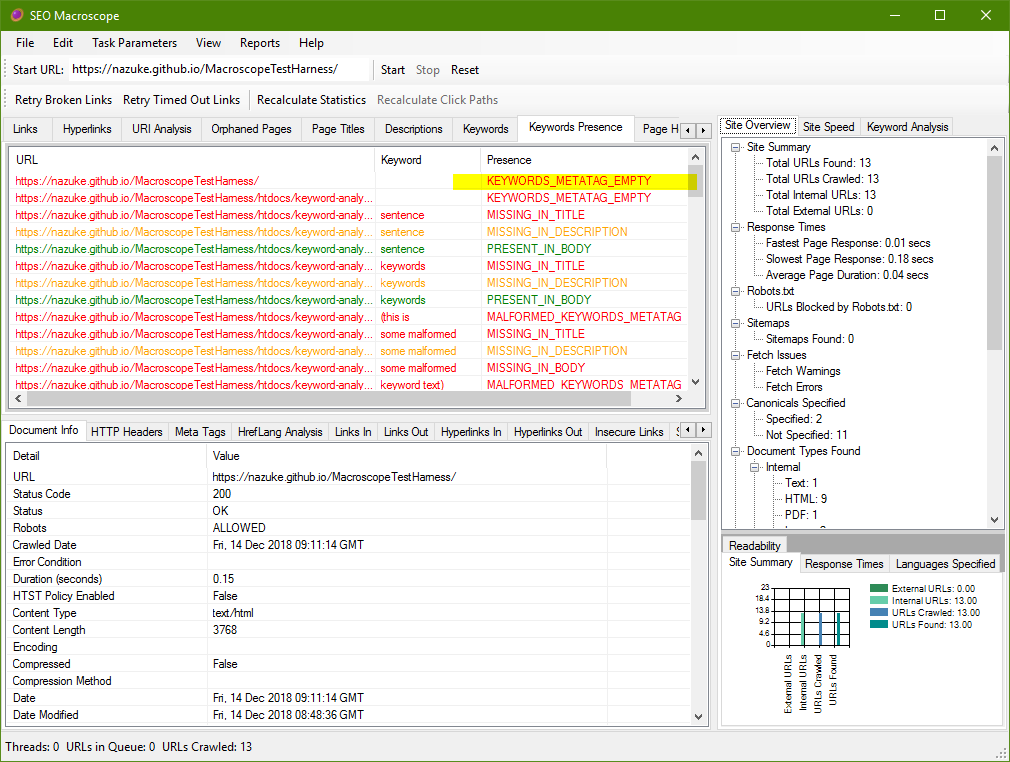
<p>If the keywords meta tag is entirely empty, then this will immediately be flagged up as a problem.</p>

<p class="screenshot"><img src="/SEOMacroscope/media/screenshots/2018-12-14-verifying-keywords-meta-tag-with-seo-macroscope/keywords-meta-tag-empty.png" alt="Empty keywords meta tag" class="img-responsive box-shadow" /></p>

<p>For most sites, this isn’t going to be a problem. In this case however, it means that the page author has forgotten to specify which keywords they’re trying to target with the page in question.</p>

<p>#h2 Malformed Keywords Meta Tag</p>

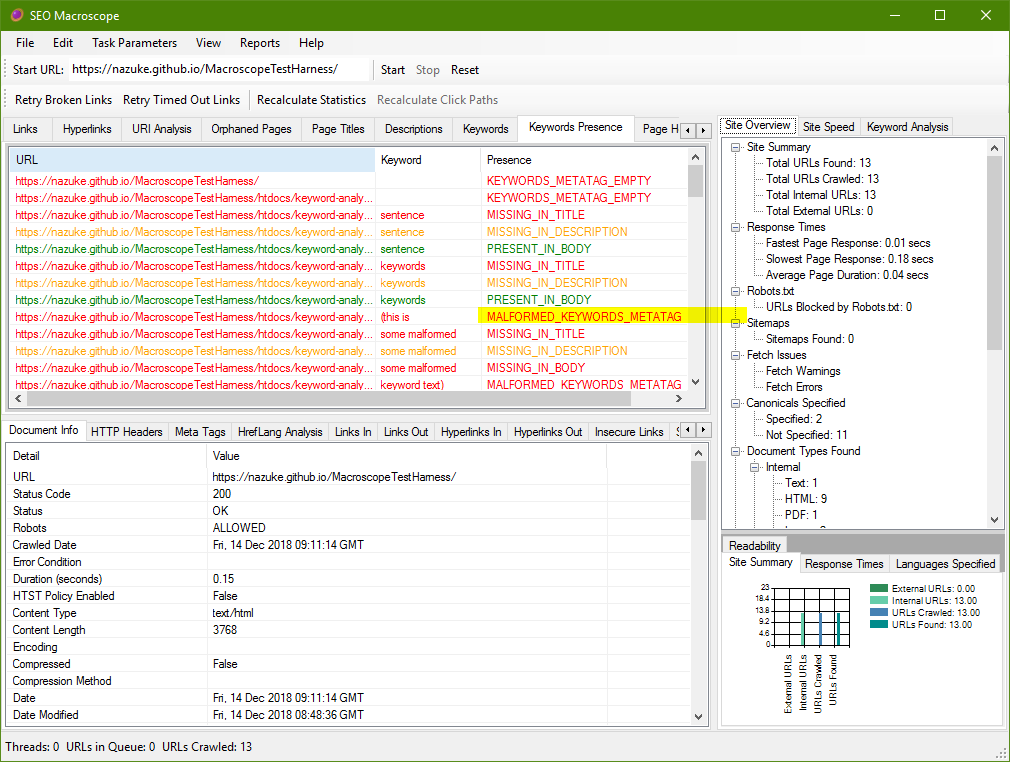
<p>Another problem that arises may be where the author has pasted the wrong data into the keywords meta tag, or simply entered text that cannot be properly parsed.</p>

<p>The keywords are defined as a comma-separated values list. This means that of the keyword list cannot be properly parsed into a list of terms, then it will be flagged as an error.</p>

<p class="screenshot"><img src="/SEOMacroscope/media/screenshots/2018-12-14-verifying-keywords-meta-tag-with-seo-macroscope/malformed-keywords-meta-tag.png" alt="Malformed keywords meta tag" class="img-responsive box-shadow" /></p>

<p>#h2 Keyword Missing in Body Text</p>

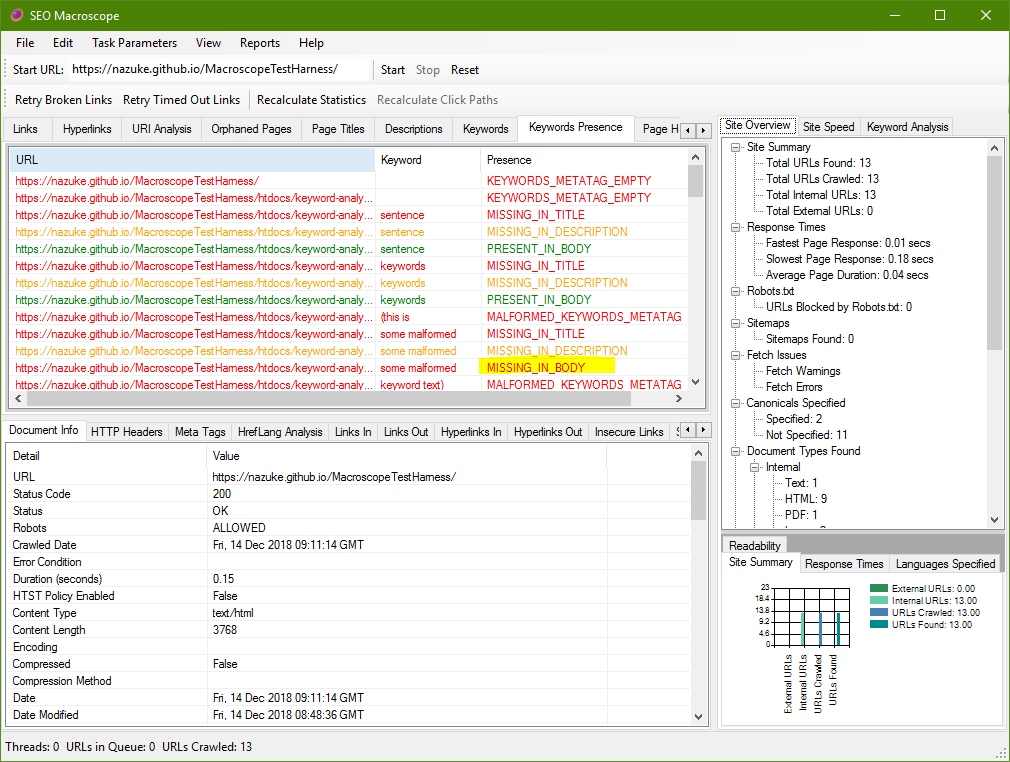
<p>If the keywords meta tag itself is fine, then the keywords themselves are analyzed, and then cross-referenced against the text in the page body, the title tag, and the description tag.</p>

<p>If a keyword is specified in the keywords meta tag, but cannot be found in the body text, then it is flagged as such:</p>

<p class="screenshot"><img src="/SEOMacroscope/media/screenshots/2018-12-14-verifying-keywords-meta-tag-with-seo-macroscope/keyword-missing-in-body.png" alt="Keyword missing in body text" class="img-responsive box-shadow" /></p>

<p>Likewise, if the keyword <em>is</em> present, then it is also reported, for clarity’s sake:</p>

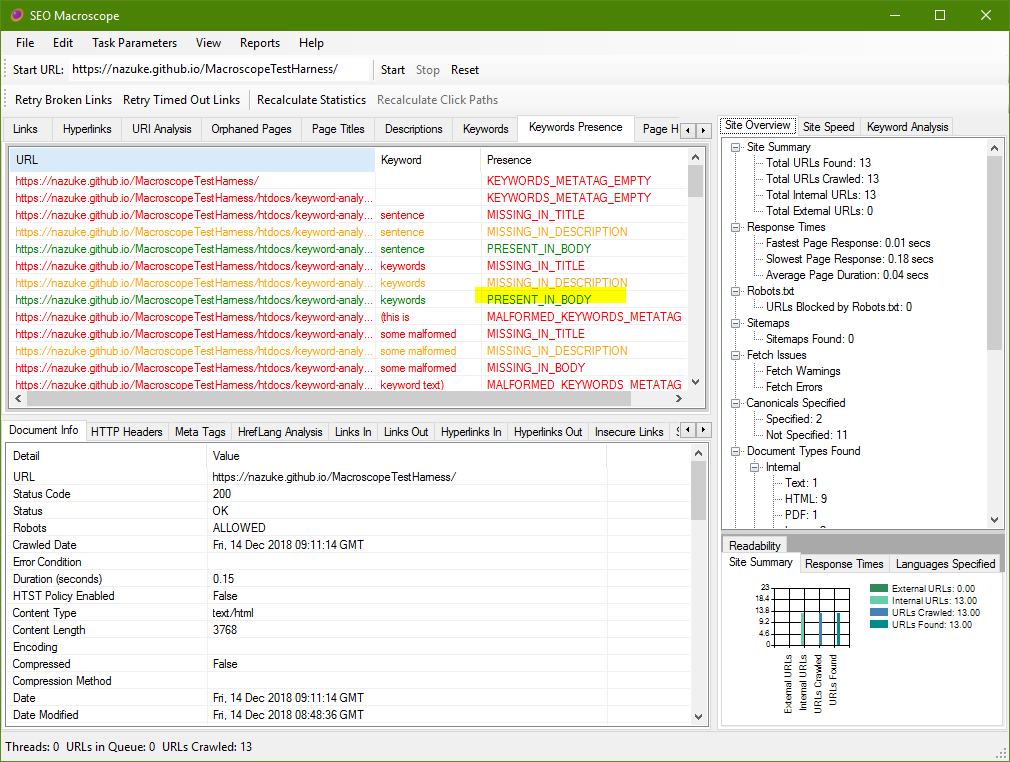
<p class="screenshot"><img src="/SEOMacroscope/media/screenshots/2018-12-14-verifying-keywords-meta-tag-with-seo-macroscope/keyword-present-in-body.png" alt="Keyword present in body text" class="img-responsive box-shadow" /></p>

<p>#h2 Keyword Missing in Title and Description</p>

<p>Similarly, if the keyword is missing from the title tag, or is present, then it is reported as such:</p>

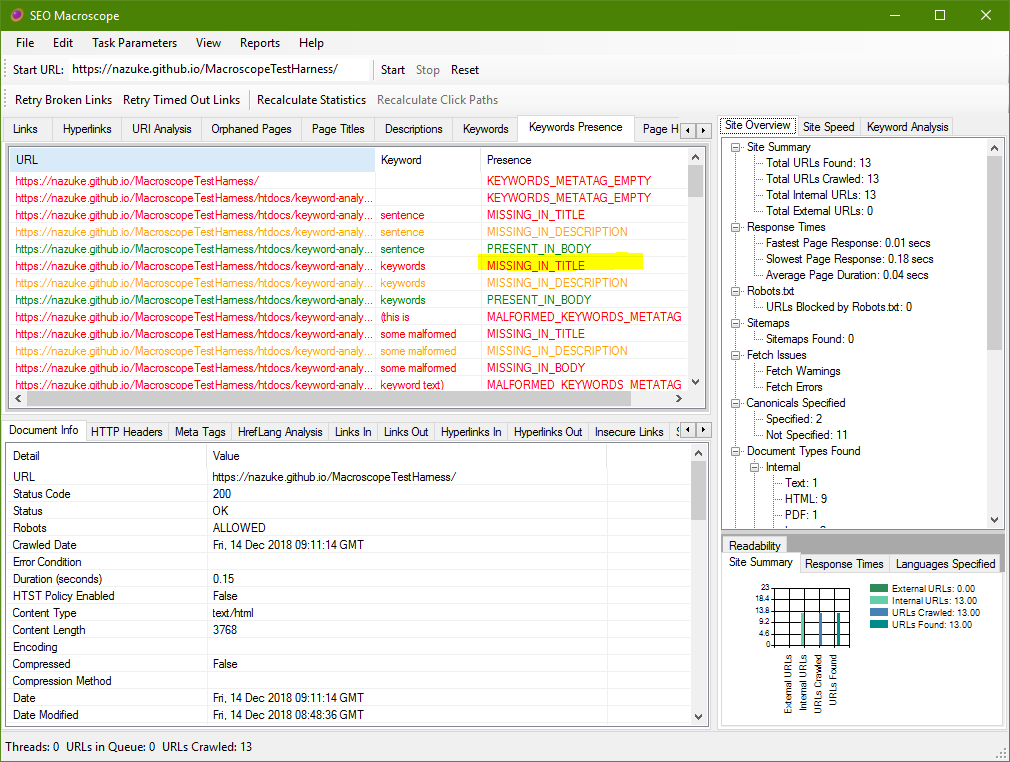
<p class="screenshot"><img src="/SEOMacroscope/media/screenshots/2018-12-14-verifying-keywords-meta-tag-with-seo-macroscope/keyword-missing-in-title.png" alt="keyword-missing-in-title" class="img-responsive box-shadow" /></p>

<p>Likewise, if it is missing from the description tag, or present, then it is reported too:</p>

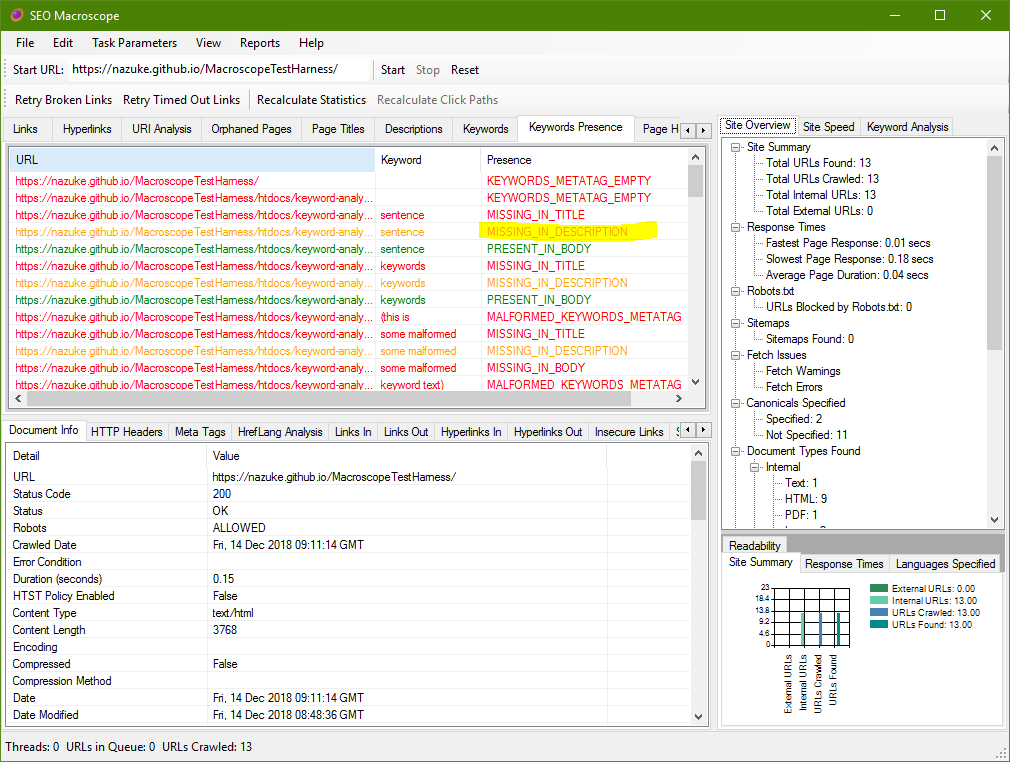
<p class="screenshot"><img src="/SEOMacroscope/media/screenshots/2018-12-14-verifying-keywords-meta-tag-with-seo-macroscope/keyword-missing-in-description.png" alt="keyword-missing-in-description" class="img-responsive box-shadow" /></p>

<p>With the title and description tags, it is up to the disgression of the author as to whether or not this is a problem.</p>]]></content><author><name></name></author><summary type="html"><![CDATA[Use SEO Macroscope to check your web page's keywords match what is specified in the keywords meta tag.]]></summary></entry><entry><title type="html">New v1.7.6 release of SEO Macroscope: Entitled</title><link href="https://nazuke.github.io/SEOMacroscope/2019/01/27/seo-macroscope-release-v1.7.6.0.html" rel="alternate" type="text/html" title="New v1.7.6 release of SEO Macroscope: Entitled" /><published>2019-01-27T00:00:00+00:00</published><updated>2019-01-27T00:00:00+00:00</updated><id>https://nazuke.github.io/SEOMacroscope/2019/01/27/seo-macroscope-release-v1.7.6.0</id><content type="html" xml:base="https://nazuke.github.io/SEOMacroscope/2019/01/27/seo-macroscope-release-v1.7.6.0.html"><![CDATA[<p class="lead">This release of SEO Macroscope enhances the keyword meta tag analysis for some legacy processing, and fixes some bugs.</p>

<p>Source code and an installer can be found on GitHub at:</p>

<ul>
  <li><a href="https://github.com/nazuke/SEOMacroscope/releases/tag/v1.7.6.0">https://github.com/nazuke/SEOMacroscope/releases/tag/v1.7.6.0</a></li>
</ul>

<p>Please check the <a href="/SEOMacroscope/downloads/">downloads page</a> for more recent versions.</p>

<h2 id="new-features-in-this-release-include">New features in this release include:</h2>

<ul>
  <li>Titles and descriptions are now included in the keywords meta tag analysis. Additionally, some malformed keywords meta tags will be reported as such.</li>
  <li>Some refactoring has been done behind the scenes to try and make the crawled document collection a little more efficient.</li>
  <li>New <strong>Recent URLs</strong> sub-menu under in the <strong>File</strong> menu.</li>
  <li>New <strong>Status Code</strong> columns in the <strong>Links</strong> and and <strong>Hyperlinks</strong> overview lists.</li>
  <li><strong>Anchor Text</strong> columns added to broken links reports.</li>
  <li>Experimental <strong>Save Session</strong> feature, to save and reload the current crawled session.</li>
</ul>

<h2 id="bug-fixes">Bug fixes</h2>

<ul>
  <li>Fixed error handling in AnalyzeKeywordPresence.</li>
  <li>Added preferences option to re-fetch linked documents from external sites that initially return a 404 on a HEAD request. This helps to verify links to external sites that have mis-configured webservers, at the expense of network bandwidth.</li>
</ul>

<p>Please report issues at <a href="https://github.com/nazuke/SEOMacroscope/issues">https://github.com/nazuke/SEOMacroscope/issues</a>.</p>

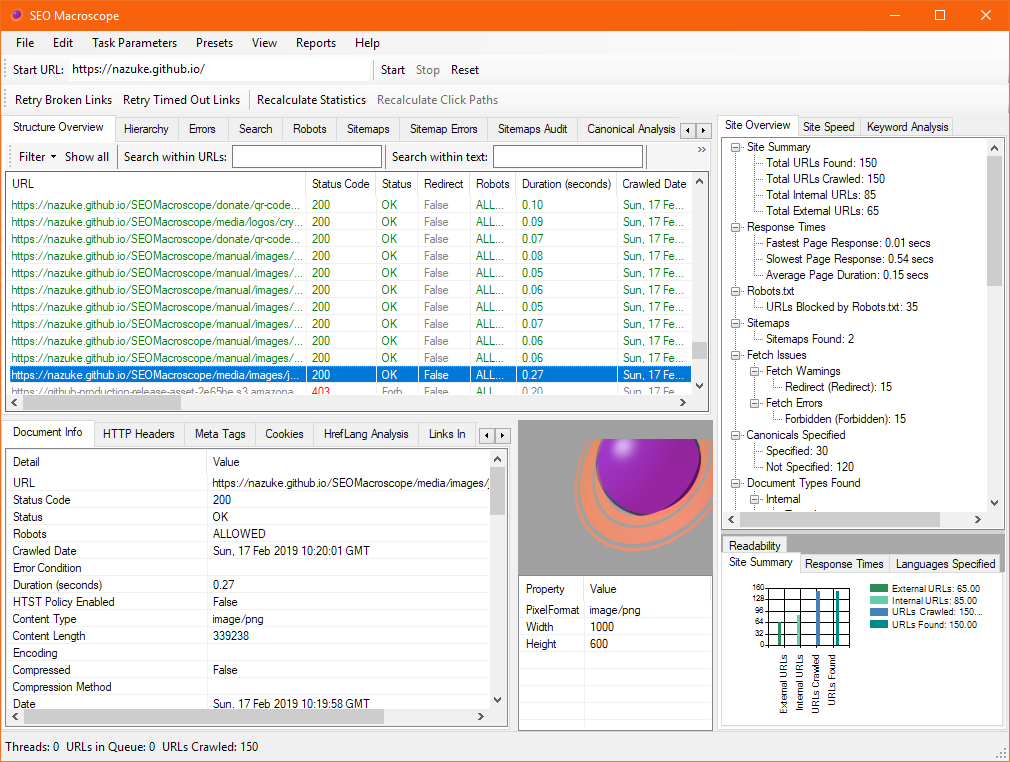
<p class="screenshot"><img src="/SEOMacroscope/media/screenshots/seo-macroscope-main-window-v1.7.5.png" alt="SEO Macroscope Application Window" class="img-responsive box-shadow" /></p>]]></content><author><name></name></author><summary type="html"><![CDATA[This release of SEO Macroscope enhances the keyword meta tag analysis for some legacy processing.]]></summary></entry><entry><title type="html">New v1.7.5 release of SEO Macroscope: Bearer of The Word</title><link href="https://nazuke.github.io/SEOMacroscope/2018/11/23/seo-macroscope-release-v1.7.5.0.html" rel="alternate" type="text/html" title="New v1.7.5 release of SEO Macroscope: Bearer of The Word" /><published>2018-11-23T00:00:00+00:00</published><updated>2018-11-23T00:00:00+00:00</updated><id>https://nazuke.github.io/SEOMacroscope/2018/11/23/seo-macroscope-release-v1.7.5.0</id><content type="html" xml:base="https://nazuke.github.io/SEOMacroscope/2018/11/23/seo-macroscope-release-v1.7.5.0.html"><![CDATA[<p class="lead">This release of SEO Macroscope adds keyword meta tag analysis for some legacy processing, and fixes some bugs.</p>

<p>Source code and an installer can be found on GitHub at:</p>

<ul>
  <li><a href="https://github.com/nazuke/SEOMacroscope/releases/tag/v1.7.5.0">https://github.com/nazuke/SEOMacroscope/releases/tag/v1.7.5.0</a></li>
</ul>

<p>Please check the <a href="/SEOMacroscope/downloads/">downloads page</a> for more recent versions.</p>

<h2 id="new-features-in-this-release-include">New features in this release include:</h2>

<ul>
  <li>A recent request was made for processing the contents of the legacy “keywords” meta tag. This feature is enabled by default, with the results available in the new <strong>Keywords Presence</strong> display list. Very briefly, the contents of the keywords meta tag is examined, and then the presence or absence of each keyword in the page body text is reported. Currently, this only applies to the body text; other elements, such as the title tag, are not processed.
    <ul>
      <li>Normally, I would advise against using the keywords meta tag in any new websites; however it appears that this meta tag is still used by some CMS platforms, and is a reasonable method to check that keywords that <em>should</em> be present in the body text <em>are</em> actually there, or not.</li>
      <li>Please note that this analysis step is separate to the existing keywords analysis; that analysis ignores the keyword meta tag entirely, and operates purely on the body text alone.</li>
    </ul>
  </li>
</ul>

<h2 id="bug-fixes">Bug fixes</h2>

<ul>
  <li>Licence window was broken.</li>
  <li>Preferences window resized for smaller screens.</li>
</ul>

<p>Please report issues at <a href="https://github.com/nazuke/SEOMacroscope/issues">https://github.com/nazuke/SEOMacroscope/issues</a>.</p>

<p class="screenshot"><img src="/SEOMacroscope/media/screenshots/seo-macroscope-main-window-v1.7.5.png" alt="SEO Macroscope Application Window" class="img-responsive box-shadow" /></p>]]></content><author><name></name></author><summary type="html"><![CDATA[This release of SEO Macroscope adds keyword meta tag analysis.]]></summary></entry><entry><title type="html">New v1.7.4 release of SEO Macroscope: Divine Predecessors</title><link href="https://nazuke.github.io/SEOMacroscope/2018/09/04/seo-macroscope-release-v1.7.4.0.html" rel="alternate" type="text/html" title="New v1.7.4 release of SEO Macroscope: Divine Predecessors" /><published>2018-09-04T18:00:00+00:00</published><updated>2018-09-04T18:00:00+00:00</updated><id>https://nazuke.github.io/SEOMacroscope/2018/09/04/seo-macroscope-release-v1.7.4.0</id><content type="html" xml:base="https://nazuke.github.io/SEOMacroscope/2018/09/04/seo-macroscope-release-v1.7.4.0.html"><![CDATA[<p class="lead">This release of SEO Macroscope adds parent directory probing, and fixes bugs.</p>

<p>Source code and an installer can be found on GitHub at:</p>

<ul>
  <li><a href="https://github.com/nazuke/SEOMacroscope/releases/tag/v1.7.4.0">https://github.com/nazuke/SEOMacroscope/releases/tag/v1.7.4.0</a></li>
</ul>

<p>Please check the <a href="/SEOMacroscope/downloads/">downloads page</a> for more recent versions.</p>

<h2 id="new-features-in-this-release-include">New features in this release include:</h2>

<ul>
  <li>There is a new option to probe parent directories for each URL found on an internal site. This builds a new set of URLs to crawl, by taking the current URL, and progressively stripping off each rightmost element until it reaches the root. Each stripped URL is then added to the list of URLs to crawl.</li>
  <li>The body text word counter has been improved, and unit tests written.</li>
  <li>Regular expression data extraction now works on PDF documents.</li>
  <li>PDF embedded link extraction and following has been improved.</li>
</ul>

<h2 id="bug-fixes">Bug fixes</h2>

<ul>
  <li>Not a bug as such, but the <em>check for update</em> phone home function now more precisely checks the current and updated version numbers, instead of doing a simple equals comparison.</li>
  <li>Keyword analysis is now skipped when humans.txt, and some other page types 404.</li>
  <li>Absolute URL handling in robots.txt has been improved.</li>
</ul>

<p>Please report issues at <a href="https://github.com/nazuke/SEOMacroscope/issues">https://github.com/nazuke/SEOMacroscope/issues</a>.</p>

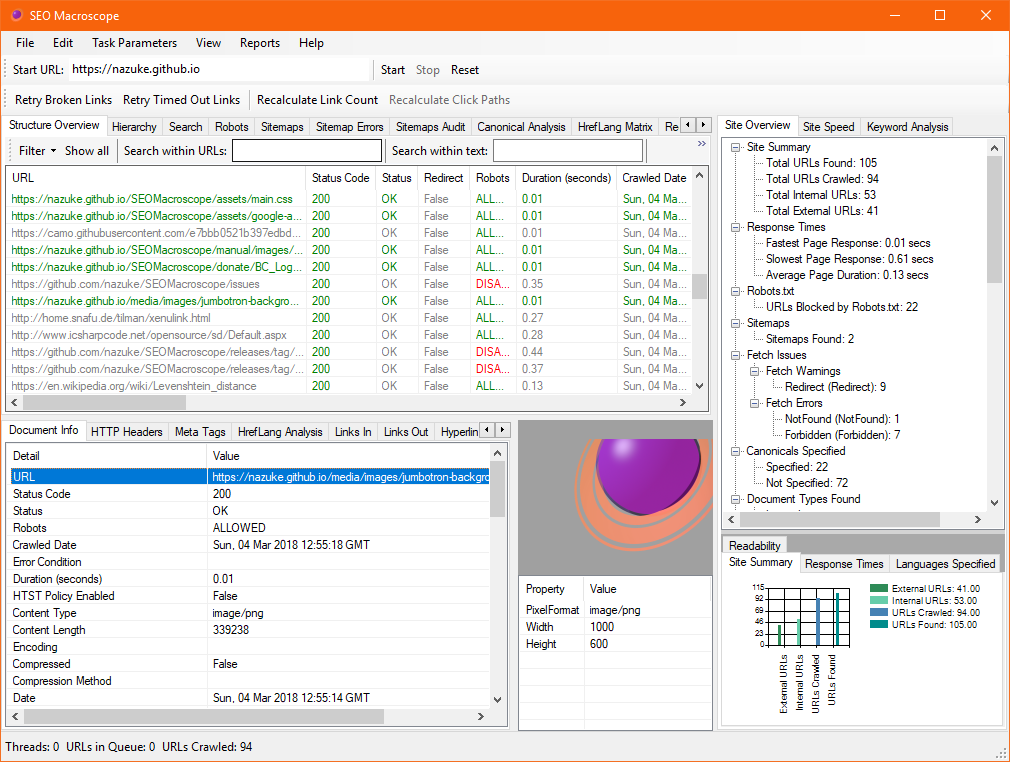
<p class="screenshot"><img src="/SEOMacroscope/media/screenshots/seo-macroscope-main-window-v1.7.png" alt="SEO Macroscope Application Window" class="img-responsive box-shadow" /></p>]]></content><author><name></name></author><summary type="html"><![CDATA[This release of SEO Macroscope adds parent directory probing.]]></summary></entry><entry><title type="html">Finding email addresses and telephone numbers with SEO Macroscope</title><link href="https://nazuke.github.io/SEOMacroscope/2018/06/04/finding-contact-details-with-seo-macroscope.html" rel="alternate" type="text/html" title="Finding email addresses and telephone numbers with SEO Macroscope" /><published>2018-06-04T18:00:00+00:00</published><updated>2018-06-04T18:00:00+00:00</updated><id>https://nazuke.github.io/SEOMacroscope/2018/06/04/finding-contact-details-with-seo-macroscope</id><content type="html" xml:base="https://nazuke.github.io/SEOMacroscope/2018/06/04/finding-contact-details-with-seo-macroscope.html"><![CDATA[<p class="lead">One of the earlier web crawlers that I wrote to help with my work as a webmaster was a Perl-based crawler that scanned the corporate website for all instances of email address and telephone number links in use. This was mostly of use for checking that no incorrect email addresses were still appearing on the website, in particular employee-specific emails in marketing campaigns.</p>

<p>So when I started work on SEO Macroscope, I recycled this idea to test out the extraction functionality, Excel and CSV reporting, and so on.</p>

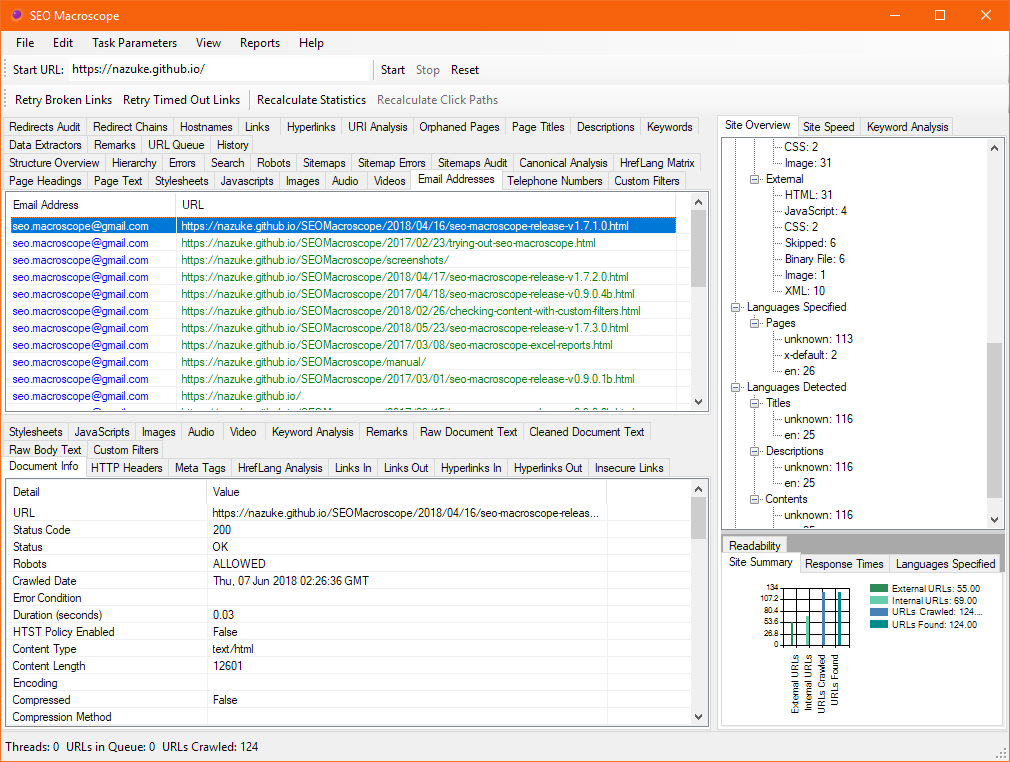
<p>In usage, it’s very simple. When scanning a website, SEO Macroscope will automatically look for email and telephone links on each HTML page, and extract them out into a list associated with each page.</p>

<p>When the scan is complete, the extracted email addresses and telephone numbers can be found under their respective tab views, and the pages on which they appear.</p>

<p class="screenshot"><img src="/SEOMacroscope/media/screenshots/2018-06-04-finding-contact-details-with-seo-macroscope/email-addresses.png" alt="Email address list view" class="img-responsive box-shadow" /></p>

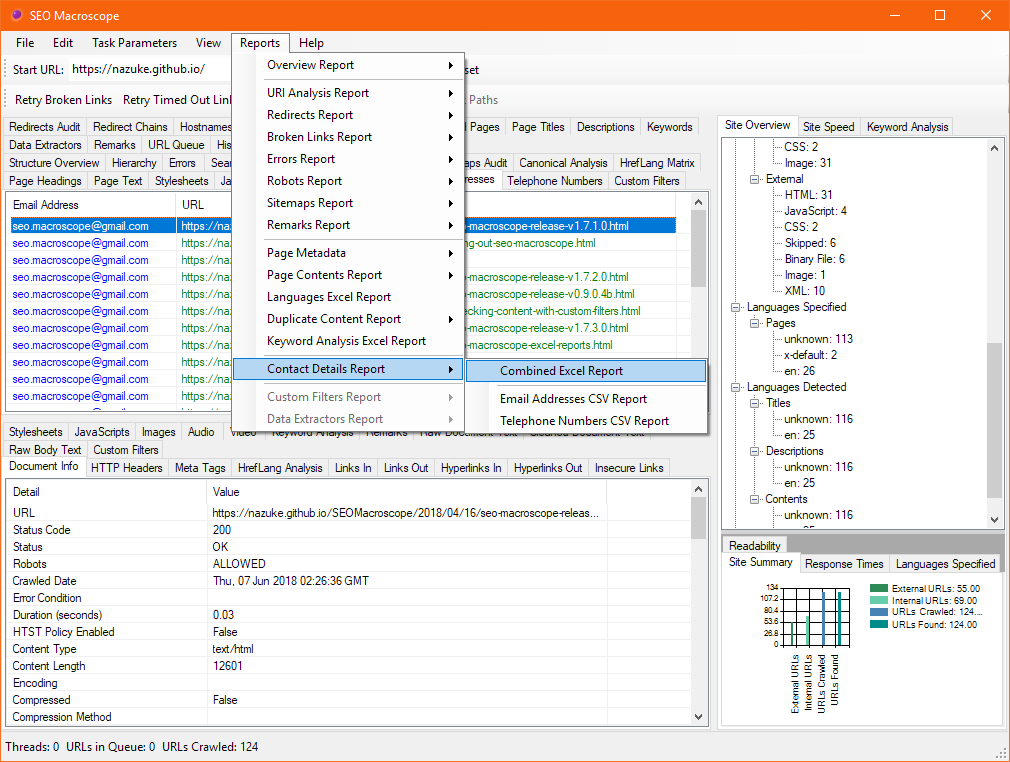
<p>In addition, the email addresses and telephone numbers can be exported as Excel or CSV reports with the <strong>Contact Details Report</strong>.</p>

<p class="screenshot"><img src="/SEOMacroscope/media/screenshots/2018-06-04-finding-contact-details-with-seo-macroscope/save-excel-report.png" alt="Export contact details to an Excel report" class="img-responsive box-shadow" /></p>

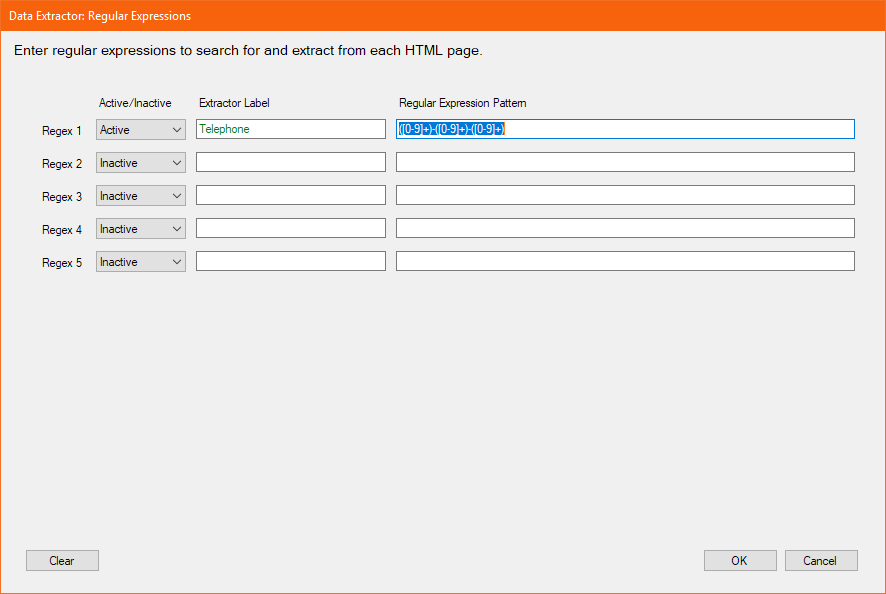
<p>The extraction process described above only operates on link elements; if you require more sophisticated extraction of email addresses or telephone numbers, then the <strong>Data Extractors</strong> functions can be used instead.</p>

<p>For example, data extractors can be configured using regular expressions to extract telephone number from the page body text, even if they do not appear in link elements. Likewise, the same is true for email addresses.</p>

<p class="screenshot"><img src="/SEOMacroscope/media/screenshots/2018-06-04-finding-contact-details-with-seo-macroscope/data-extractors-regex.png" alt="Extract telephone numbers with regular expressions" class="img-responsive box-shadow" /></p>]]></content><author><name></name></author><summary type="html"><![CDATA[SEO Macroscope provides some simple features to find email and telephone links used throughout your website.]]></summary></entry><entry><title type="html">New v1.7.3 release of SEO Macroscope: Chainlinks</title><link href="https://nazuke.github.io/SEOMacroscope/2018/05/23/seo-macroscope-release-v1.7.3.0.html" rel="alternate" type="text/html" title="New v1.7.3 release of SEO Macroscope: Chainlinks" /><published>2018-05-23T08:00:00+00:00</published><updated>2018-05-23T08:00:00+00:00</updated><id>https://nazuke.github.io/SEOMacroscope/2018/05/23/seo-macroscope-release-v1.7.3.0</id><content type="html" xml:base="https://nazuke.github.io/SEOMacroscope/2018/05/23/seo-macroscope-release-v1.7.3.0.html"><![CDATA[<p class="lead">This release of SEO Macroscope primarily fixes a number of minor bugs, and adds a few new features.</p>

<p>Source code and an installer can be found on GitHub at:</p>

<ul>
  <li><a href="https://github.com/nazuke/SEOMacroscope/releases/tag/v1.7.3.0">https://github.com/nazuke/SEOMacroscope/releases/tag/v1.7.3.0</a></li>
</ul>

<p>Please check the <a href="/SEOMacroscope/downloads/">downloads page</a> for more recent versions.</p>

<h2 id="new-features-in-this-release-include">New features in this release include:</h2>

<ul>
  <li>Where possible, Author fields are extracted from HTML and PDF documents.</li>
  <li>The Page Metadata Excel report has a new worksheet that combines the crawled author, title, description, and keywords fields.
    <ul>
      <li>This can be useful when crawling a list of PDF documents, as it extracts that information into a single worksheet.</li>
    </ul>
  </li>
  <li>A simple check for update feature has been added. This will show an alert if a new version of SEO Macroscope appears to be available.</li>
  <li>HTML page character set sniffing has been enhanced.</li>
</ul>

<h2 id="bug-fixes">Bug fixes</h2>

<ul>
  <li>Rewrote the redirect chain analysis code, so that the redirect chain analysis should now be more complete for each crawl. Previously, the redirect chain list was built from the crawled document collection, which meant that some redirects were missing if they had not been crawled yet. Not, an explicit HEAD request is executed for each document that redirects, until no more redirects are encountered.</li>
  <li>There was a locking fault in the crawled document collection, that caused some documents to never be fetched.</li>
</ul>

<p>Please report issues at <a href="https://github.com/nazuke/SEOMacroscope/issues">https://github.com/nazuke/SEOMacroscope/issues</a>.</p>

<p class="screenshot"><img src="/SEOMacroscope/media/screenshots/seo-macroscope-main-window-v1.7.png" alt="SEO Macroscope Application Window" class="img-responsive box-shadow" /></p>]]></content><author><name></name></author><summary type="html"><![CDATA[This release of SEO Macroscope primarily fixes a number of minor bugs.]]></summary></entry><entry><title type="html">New v1.7.2 release of SEO Macroscope: Two to talk</title><link href="https://nazuke.github.io/SEOMacroscope/2018/04/17/seo-macroscope-release-v1.7.2.0.html" rel="alternate" type="text/html" title="New v1.7.2 release of SEO Macroscope: Two to talk" /><published>2018-04-17T03:00:00+00:00</published><updated>2018-04-17T03:00:00+00:00</updated><id>https://nazuke.github.io/SEOMacroscope/2018/04/17/seo-macroscope-release-v1.7.2.0</id><content type="html" xml:base="https://nazuke.github.io/SEOMacroscope/2018/04/17/seo-macroscope-release-v1.7.2.0.html"><![CDATA[<p class="lead">This release of SEO Macroscope primarily fixes a number of minor bugs.</p>

<p>Source code and an installer can be found on GitHub at:</p>

<ul>
  <li><a href="https://github.com/nazuke/SEOMacroscope/releases/tag/v1.7.2.0">https://github.com/nazuke/SEOMacroscope/releases/tag/v1.7.2.0</a></li>
</ul>

<p>Please check the <a href="/SEOMacroscope/downloads/">downloads page</a> for more recent versions.</p>

<h2 id="bug-fixes">Bug fixes</h2>

<ul>
  <li>Incorrect behaviour of progress dialogues.</li>
  <li>Removed memory guard on sitemap generators, that may have prevented sitemap generation under certain circumstances.</li>
</ul>

<p>Please report issues at <a href="https://github.com/nazuke/SEOMacroscope/issues">https://github.com/nazuke/SEOMacroscope/issues</a>.</p>

<p class="screenshot"><img src="/SEOMacroscope/media/screenshots/seo-macroscope-main-window-v1.7.png" alt="SEO Macroscope Application Window" class="img-responsive box-shadow" /></p>]]></content><author><name></name></author><summary type="html"><![CDATA[This release of SEO Macroscope primarily fixes a number of minor bugs.]]></summary></entry><entry><title type="html">New v1.7.1 release of SEO Macroscope: HTTP Too and a half</title><link href="https://nazuke.github.io/SEOMacroscope/2018/04/16/seo-macroscope-release-v1.7.1.0.html" rel="alternate" type="text/html" title="New v1.7.1 release of SEO Macroscope: HTTP Too and a half" /><published>2018-04-16T03:00:00+00:00</published><updated>2018-04-16T03:00:00+00:00</updated><id>https://nazuke.github.io/SEOMacroscope/2018/04/16/seo-macroscope-release-v1.7.1.0</id><content type="html" xml:base="https://nazuke.github.io/SEOMacroscope/2018/04/16/seo-macroscope-release-v1.7.1.0.html"><![CDATA[<p class="lead">This release of SEO Macroscope primarily fixes bugs from v1.7.</p>

<p>Source code and an installer can be found on GitHub at:</p>

<ul>
  <li><a href="https://github.com/nazuke/SEOMacroscope/releases/tag/v1.7.1.0">https://github.com/nazuke/SEOMacroscope/releases/tag/v1.7.1.0</a></li>
</ul>

<p>Please check the <a href="/SEOMacroscope/downloads/">downloads page</a> for more recent versions.</p>

<h2 id="new-features-in-this-release-include">New features in this release include:</h2>

<ul>
  <li>There is a new hyperlink ratio feature found in the document details panel, and in the overview Excel and CSV reports. This calculates the percentage value for the number of hyperlinks in and out of a particular document, within the crawled collection. It does not include links from third-party sites not in the crawled collection.</li>
  <li>The web proxy settings may now now the systems configured proxies.</li>
</ul>

<h2 id="bug-fixes">Bug fixes</h2>

<ul>
  <li>A malformed User-Agent HTTP Header caused some websites to not be crawled at all.</li>
</ul>

<p>Please report issues at <a href="https://github.com/nazuke/SEOMacroscope/issues">https://github.com/nazuke/SEOMacroscope/issues</a>.</p>

<p class="screenshot"><img src="/SEOMacroscope/media/screenshots/seo-macroscope-main-window-v1.7.png" alt="SEO Macroscope Application Window" class="img-responsive box-shadow" /></p>]]></content><author><name></name></author><summary type="html"><![CDATA[This release of SEO Macroscope primarily fixes bugs from v1.7.]]></summary></entry><entry><title type="html">Identifying Duplicate and Near-Duplicate Content with SEO Macroscope</title><link href="https://nazuke.github.io/SEOMacroscope/2018/04/15/identifying-near-duplicate-content-with-seo-macroscope.html" rel="alternate" type="text/html" title="Identifying Duplicate and Near-Duplicate Content with SEO Macroscope" /><published>2018-04-15T18:00:00+00:00</published><updated>2018-04-15T18:00:00+00:00</updated><id>https://nazuke.github.io/SEOMacroscope/2018/04/15/identifying-near-duplicate-content-with-seo-macroscope</id><content type="html" xml:base="https://nazuke.github.io/SEOMacroscope/2018/04/15/identifying-near-duplicate-content-with-seo-macroscope.html"><![CDATA[<p class="lead">I have been implementing several different methods to try and identify duplicate and near-duplicate content within the set of pages crawled.</p>

<h2 id="simple-etag-and-checksum-logging">Simple ETag and Checksum Logging</h2>

<p>The simplest of these is achieved by recording the ETag HTTP Header, if it’s returned by the remote web server, and identify which of the crawled URLs appear to have the same ETag value.</p>

<p>Similarly, for any documents that SEO Macroscope actually downloads (such as HTML, PDFs, etc…), a checksum value is computed. Different URLs that have the same checksum are a strong indicator that the content is exactly the same.</p>

<h2 id="finding-duplicates-by-levenshtein-edit-distance">Finding duplicates by Levenshtein Edit Distance</h2>

<p>Another technique that I’ve used is <a href="https://en.wikipedia.org/wiki/Levenshtein_distance">Levenshtein Edit Distance</a> measuring; leveraging <a href="https://github.com/DanHarltey/Fastenshtein">Dan Harltey’s Fastenshtein implementation</a>. Currently, SEO Macroscope will only apply this to documents that have body text in them, such as HTML pages and PDFs.</p>

<p>Briefly, what that means is that if you have multiple pages on your site that are very closely similar, but perhaps with a few minor differences, then these may be detected and reported upon. For example, if two pages are very closely similar, but perhaps they were rendered with very slightly different text in them somewhere, then they will not have matching checksums, but they may be similar enough to fall within the Levenshtein Edit Distance threshold that you specify.</p>

<p>A typical example may be an ecommerce site, that presents much the same content under different URL variations.</p>

<p>The only drawback is that this is quite an intensive process if there are a lot of pages on your site; so it may be necessary to restrict spidering to a subset.</p>

<p>The SEO Macroscope preferences includes options to specify the initial similarity of the documents to apply the Levenshtein algorithm to. If documents that fall within the parameters are found, they will be reported.</p>

<h2 id="export-excel-reports">Export Excel Reports</h2>

<p>In all cases, the ETags, checksums, and Levenshtein Edit Distance values can be found by exporting a <strong>Duplicate Content Report</strong> from the Reports menu, after completing a crawl of your website.</p>

<p>Please note that if you have enabled Levenshtein Edit Distance in the preferences, it may take quite some time for the report to be generated.</p>]]></content><author><name></name></author><summary type="html"><![CDATA[How to use SEO Macroscope to identify near-duplicate content across your website.]]></summary></entry></feed>